
What Are Btrfs Subvolumes? And Why They’re Better Than Traditional Linux Partitions
For many Linux users, partitioning is the most nerve-wracking part of installation. It’s that moment where you double-check everything, hoping you don’t wipe the wrong drive or end up with a layout you’ll regret later.
I like to think of a disk as a cabinet. The fixed “drawers” are partitions, and if one turns out to be too small, fixing it later means resizing, moving things around, and hoping nothing breaks in the process.
But what if partitions were not like the fixed drawers? What if they were like those adjustable shelves instead that could adapt as your needs change?
That’s exactly what Btrfs subvolumes bring to the table. Subvolumes are one of the most powerful features of Btrfs file system that provides independently mountable directory trees that all share the same underlying disk pool.
I am going to discuss this subvolume feature specifically, and why it changes how you think about disk management. And once you get used to them, it’s hard to go back.
The Problem with Traditional Partitioning
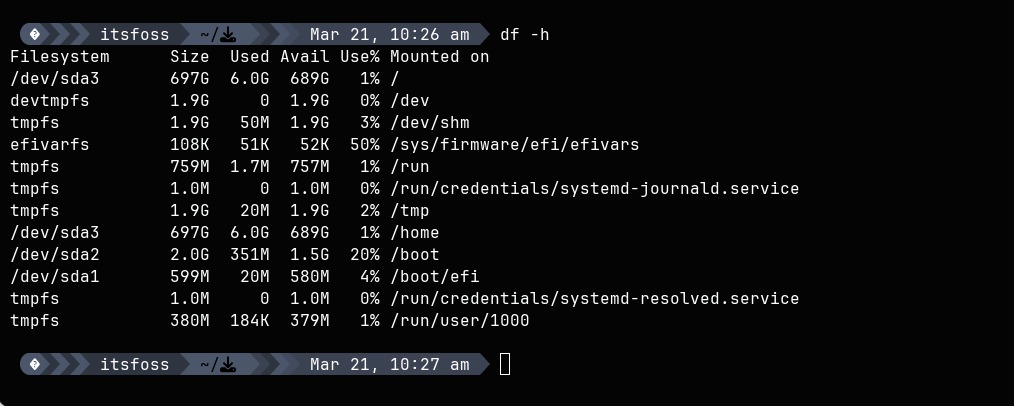
While the analogy is okay, let’s see the real thing.
With a typical Ext4 setup, you decide everything upfront. Maybe you give 50GB to / and the rest to /home. It seems reasonable, until it isn’t.
A few months later, your root partition fills up thanks to Flatpaks, containers, or system updates. Meanwhile, your home partition might still have hundreds of gigabytes sitting unused. The system can’t borrow that space, even if it desperately needs it.
That’s the limitation of fixed partitions. Btrfs subvolumes were designed to solve exactly this.
A Smarter Approach with Subvolumes
Btrfs takes a different approach. Instead of splitting your disk into rigid chunks, it creates a shared storage pool.
Subvolumes act like partitions from the outside, you can mount one as root and another as home, but under the hood, they all draw from the same free space. There’s no need to resize anything. If one part of your system needs more storage, it simply uses what’s available.
This works because subvolumes are not separate block devices. They are namespaces within a single Btrfs filesystem. You get the organisational benefits of partitions without their rigidity.
This flexibility makes a huge difference in everyday use.
Check If You’re Already Using Btrfs subvolume
If you’re on Fedora or openSUSE, chances are you’re already using Btrfs. Still, you can confirm your filesystem type with:
findmnt -no FSTYPE /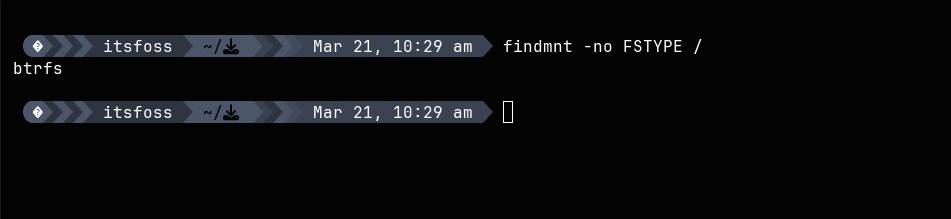
And if you are using Btrfs, subvolumes are almost certainly already set up for you. To check your subvolume layout directly:
sudo btrfs subvolume list /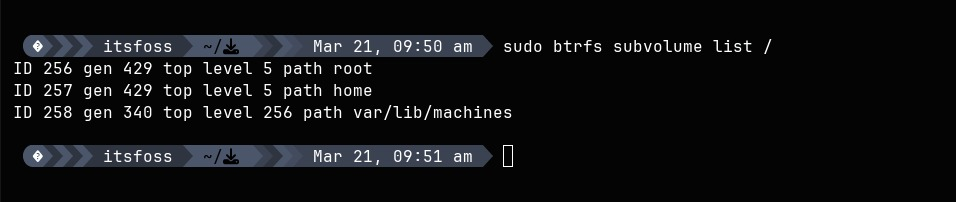
You’ll likely see entries like root and home. This is a common “flat layout,” where root your main system ( / ) and home represents your personal files.
Even though they appear separate, they’re just different subvolumes sharing the same disk space. You can confirm this by checking how they are mounted using the mount command:
mount | grep btrfs
This output shows how Btrfs subvolumes are mounted and used by the system. Both root (/) and home (/home) are coming from the same physical partition. This confirm, no separate partitions are used.
Snapshots: The Killer Feature of Subvolumes
Snapshots are where Btrfs really shines and it’s important to understand why.
In Btrfs, a snapshot is itself a subvolume. When you take a snapshot, you’re asking Btrfs to create a new subvolume that initially shares all the same data as the original, without actually copying anything and it happens almost instantly. Even on large systems, it doesn’t actually copy all your data; it just records the current state.
First, create a directory for snapshots:
sudo mkdir /snapshotsThen take a snapshot of your root subvolume:
sudo btrfs subvolume snapshot / /snapshots/before-update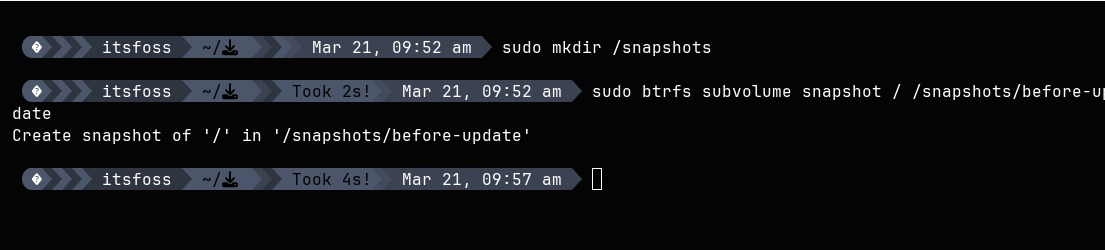
That’s it. You now have a complete snapshot of your system before making changes. If an update goes wrong, you have a fallback ready.
Now verify it:
sudo btrfs subvolume list /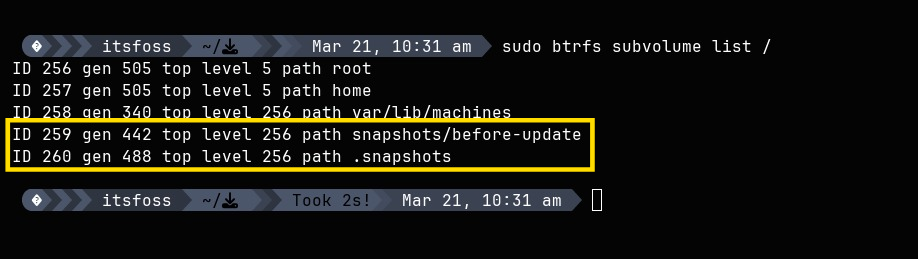
You see the snapshots/before-update listed alongside the root and home subvolumes because it is a subvolume, just one that was born from a snapshot operation.
How Subvolumes Make Snapshots Efficient: Copy-on-Write
In the previous section, I mentioned that Snapshots are nearly instant and take up almost no extra space when first created. This is possible because of how subvolumes use Copy-on-Write (CoW) internally.
You see, when two subvolumes, root and its snapshot in our example, share a block of data, neither actually holds a copy. They both point to the same underlying data. Only when one of them changes that data, Btrfs writes changes to a different location, updating the pointer for just that subvolume. The other subvolume keeps pointing to the original.
This is why:
- Snapshots are created almost instantly, even on large systems
- A fresh snapshot uses almost no additional disk space
- The original data is never lost mid-write if something goes wrong
Understanding Disk Usage with Subvolumes
Disk space reporting can feel a bit confusing with Btrfs. Traditional tools like df -h don’t always show the full picture because snapshots share data.
For a clearer view, use:
sudo btrfs filesystem usage /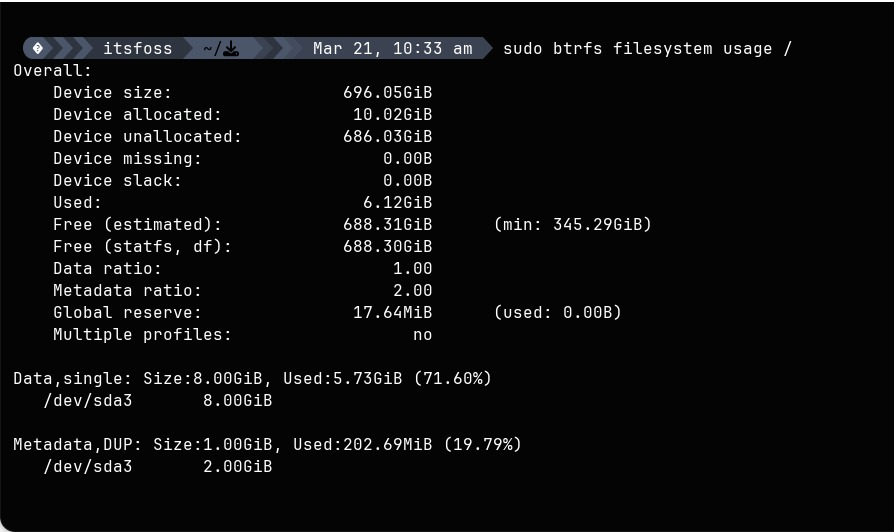
If your disk seems unexpectedly full, old snapshots are often the reason. Because each snapshot is a subvolume holding references to data, deleting a file in your live system doesn’t free space if an older snapshot still holds a reference to it.
Cleaning up old snapshot subvolumes is the solution and the process is straightforward:
sudo btrfs subvolume delete /snapshots/old-snapshot-nameThe Downsides of Subvolumes
Subvolumes aren’t without trade-offs.
Because every write in a subvolume goes through Copy-on-Write, write-heavy workloads like databases or virtual machine disk images can see a performance penalty. Over time, CoW writes can also lead to fragmentation within subvolumes.
For directories inside a subvolume where you want to opt out of CoW behaviour (and therefore lose snapshot coverage for those paths), you can disable it with:
chattr +C /var/lib/libvirt/images
There’s also some background maintenance, like balancing storage across the pool, but most modern distributions handle this automatically.
Conclusion
As you can see, Btrfs subvolumes change the fundamental model of how storage is organized. Instead of fixed partitions at install time, you define logical boundaries with subvolumes that all share the same pool and can be snapshotted individually instantly.
The flexibility, the snapshots, the efficient disk usage that come with Btrfs are due to its subvolumes feature. Shared pool, CoW data sharing, and per-subvolume state tracking, once you understand the workings of subvolumes, you’ll start appreciating Btrfs even more.
And once you get used to working that way, going back to traditional filesystem will be nearly impossible. I mean this is why Btrfs is the choice of a modern Linux system, right?
